This is a quick write up on localization based on different scenarios we encounter in app development , how Stringsdict file is more advantageous in certain scenarios that plain strings file.This article assumes basic understanding of localization on iOS.
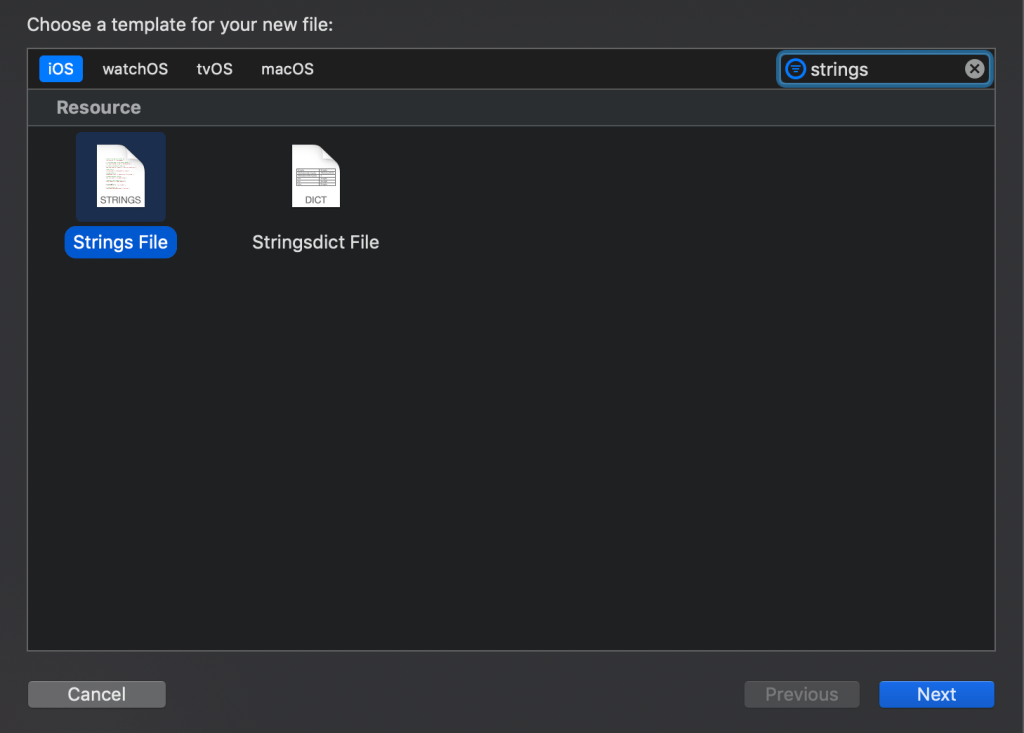
Scenario 1: What if I want to show different localization strings for singular and plural string
Using Localizable.Strings
ZERO_ITEMS_MESSAGE = “There are no items in the cart”;
SINGULAR_ITEM_MESSAGE = “There is 1 item in the cart”;
PLURAL_ITEMS_MESSAGE = “There are %u items in the cart”;
private func setSingularPluralLabels(numberOfItems: Int){
switch numberOfItems {
case 0:
singularPluralLabel.text = NSLocalizedString(“ZERO_ITEMS_MESSAGE”, comment: “”)
case 1:
singularPluralLabel.text = NSLocalizedString(“SINGULAR_ITEM_MESSAGE”, comment: “”)
default:
let formatString = NSLocalizedString(“PLURAL_ITEMS_MESSAGE”, comment:””)
singularPluralLabel.text = String.localizedStringWithFormat(formatString, numberOfItems)
}
}
Using Localizable.stringsdict – “items count” – NSStringPluralRuleType

private func setSingularPluralLabels(numberOfItems: Int){
let formatString : String = NSLocalizedString(“items count”, comment: “”)
let resultString1 : String = String.localizedStringWithFormat(formatString, numberOfItems)
singularPluralLabel.text = resultString1
}
Scenario 2: What if I want to show different localization strings for different device types like iPhone/iPad
Using Localizable.Strings
iPHONE_TEXT = “Hey iPhone users, Welcome”;
iPAD_TEXT = “Hey iPad user , Welcome to new world of localization”;
In viewcontroller :
private func setDeviceSpecificLabels(){
switch UIDevice.current.userInterfaceIdiom {
case .pad:
deviceSpecificLabel.text = NSLocalizedString(“iPAD_TEXT”, comment: “”)
case .phone:
deviceSpecificLabel.text = NSLocalizedString(“iPHONE_TEXT”, comment: “”)
default: break;
}
}
Using Localizable.stringsdict – “Message” – NSStringDeviceSpecificRuleType
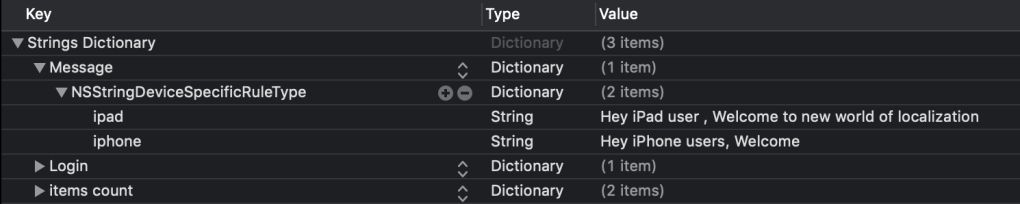
private func setDeviceSpecificLabels(){
deviceSpecificLabel.text = NSLocalizedString(“Message”, comment: “”)
}
Scenario 3: What if I want to show different localization strings for different device sizes like iphone8/iphone 11 pro mac
Using Localizable.Strings
LOGIN_TEST_SMALL = “Please enter with credentials”;
LOGIN_TEST_LARGE = “Please enter with username and password”;
private func setWidthSpecificLabels(){
if (UIScreen.main.bounds.width == 375.0) {
widthSpecificLabel.text = NSLocalizedString(“LOGIN_TEST_SMALL”, comment: “”)
}
else {
widthSpecificLabel.text = NSLocalizedString(“LOGIN_TEST_LARGE”, comment: “”)
}
}
Using Localizable.stringsdict – “Login” – NSStringVariableWidthRuleType
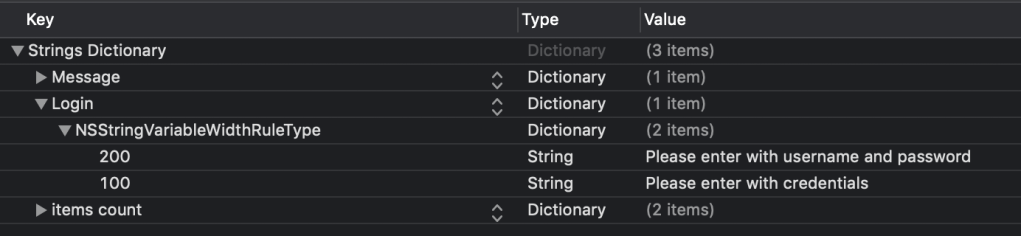
private func setWidthSpecificLabels(){
let widthSpecificString = NSLocalizedString(“Login”, comment: “”) as NSString
widthSpecificLabel.text = widthSpecificString.variantFittingPresentationWidth(UIScreen.main.bounds.width == 375.0 ? 100 : 200)
}
 MobileDevKnowledgeShare